Go beyond the bars.
The truth about mobile coverage, in your hands.

Betting on mobile? Broadcast, live events, telematics, point of sale, first responders: SurfScan reads every live sector across all operators in one pass, and shows you the coverage and capacity really deployed where you're working.

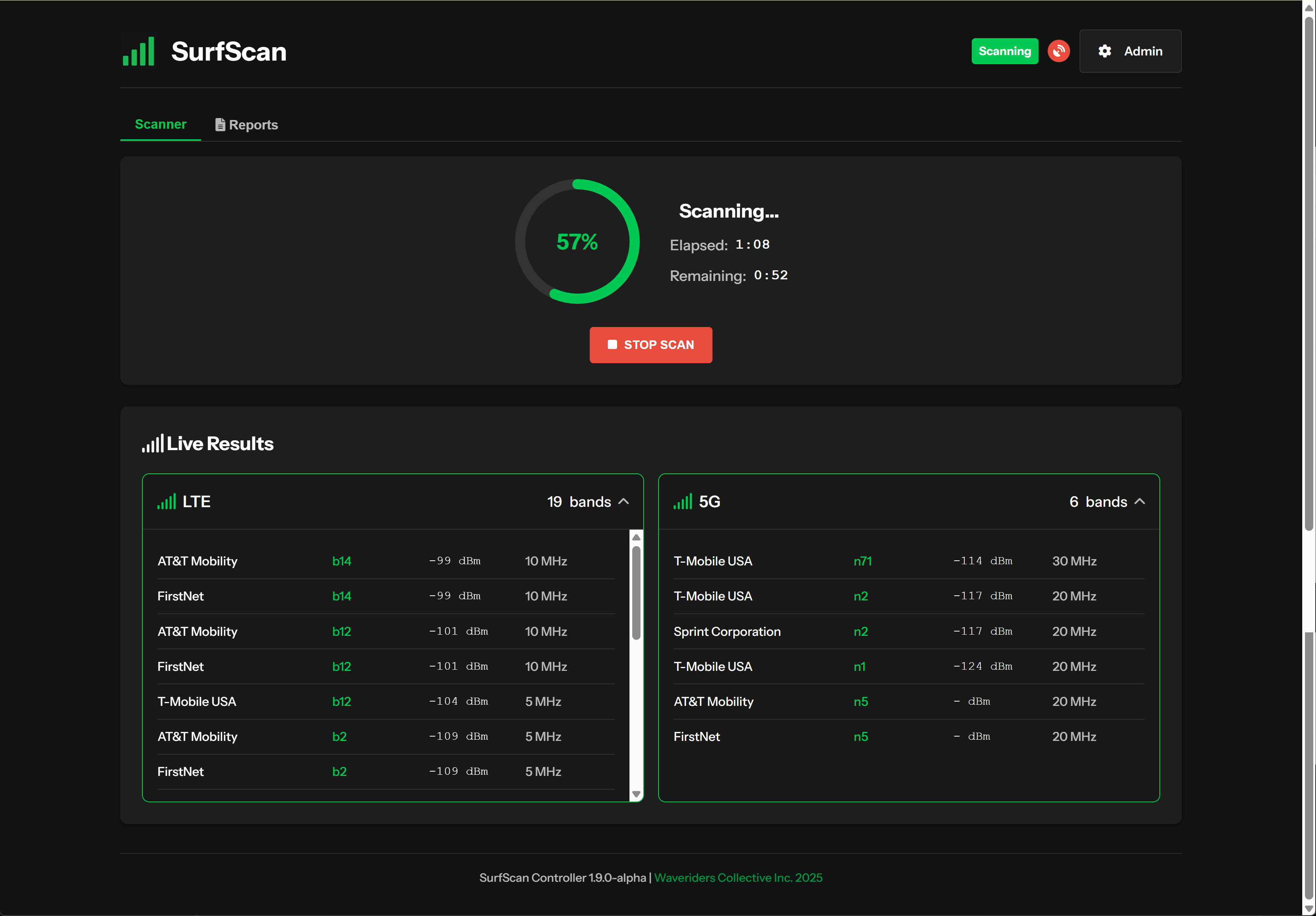
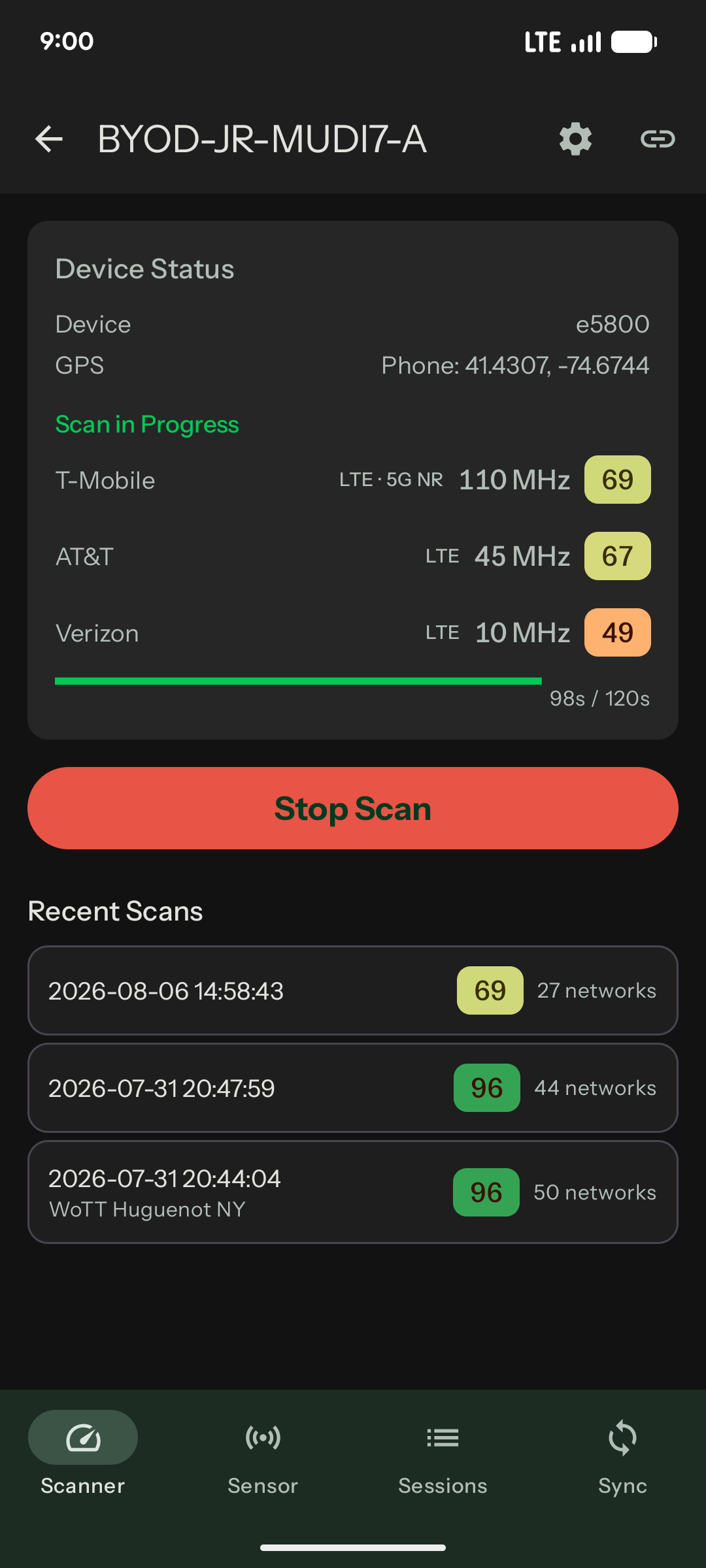
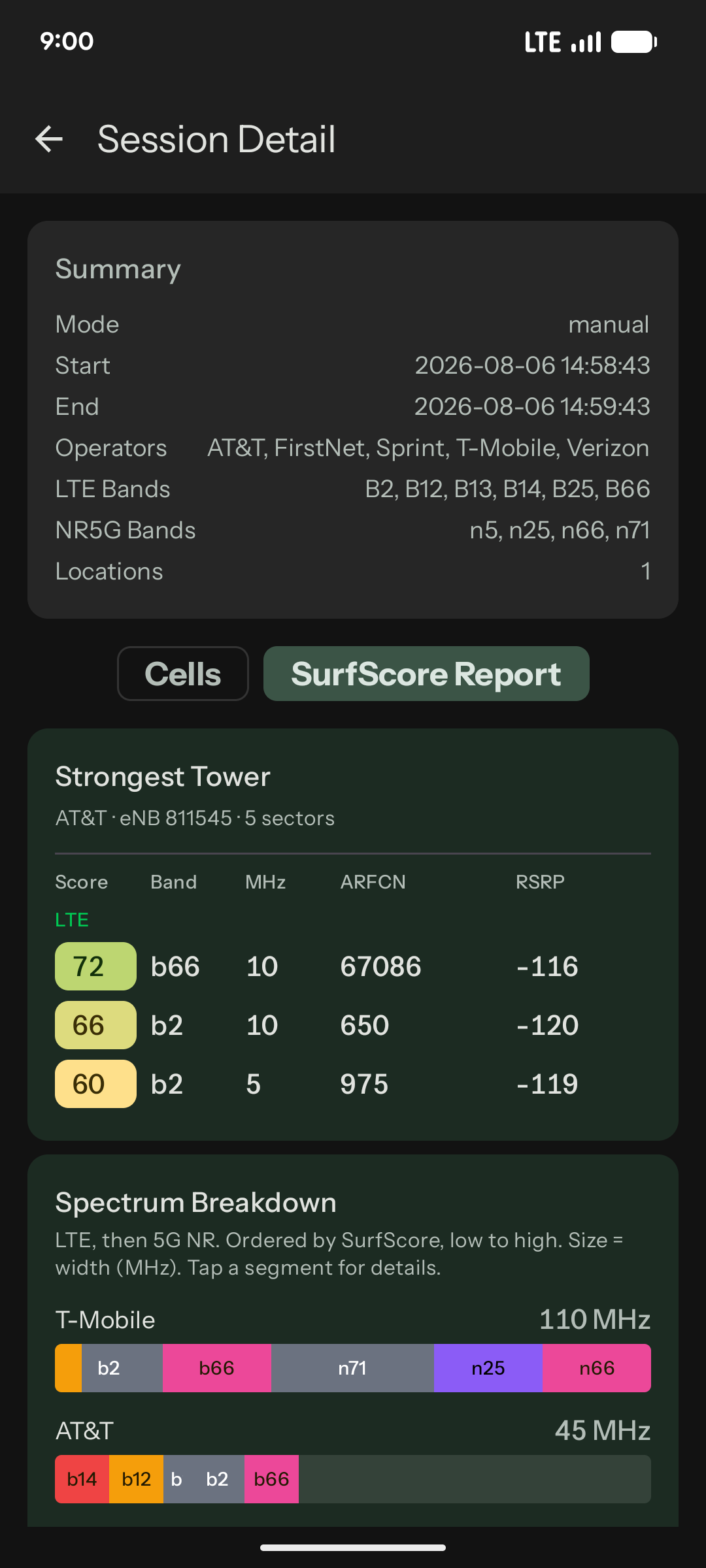
SurfScan app running a live scan on a GL.iNet router, with per-operator SurfScores updating in real time SurfScan app SurfScore report showing strongest-tower ranking and spectrum breakdown by operator

We needed better data on mobile networks, and the current tools don't cut it. So we built our own.

None of this is anyone's fault. The operators publish estimates and disclose nothing usable, so we improvise and overprovision to compensate.

Coverage Maps

Operator coverage maps show estimated outdoor coverage only. No details on which bands are deployed, bandwidth available or total capacity.

Signal Bars

Strength without context. Five bars on an overloaded sector still means poor performance. Signal strength alone isn't enough.

Speedtests

Measure performance on one band, at a single point in time, on one device. Not enough to make a business critical decision.

Spectrum Analyzers

Expensive, specialist, and weeks from mobilising an engineer to receiving a report.

If you're evaluating operators for a fleet of vehicles, planning a broadcast uplink, or deploying mission-critical connectivity, you need to know what's actually in the air at your location. Not an operator's marketing map. Not a model. Your own real-world scans.
How our customers put it

“With a 3 minute scan we know which network we can rely on the most.”

Chris Geerdes Disney/ABC

“The SurfScan is now a requirement in my tech kit.”

Derek Nickell Teradek

“I've wanted this kind of data for the longest time. Any organization that relies on cellular data connectivity would be foolish not to deploy this.”

Peter Schneider Gotham Sound

SurfScan on your GL.iNet router. True BYOD.

App install → router install → first scan in under 5 minutes.

Three minutes is the scan we recommend: long enough to find every carrier, band and layer of infrastructure present. A shorter scan only finds you whatever's loudest.

1

Start your SurfScore.live subscription

2

Install the free SurfScan app

Sign in with your account.

3

Install SurfScan onto your router from the app

Run your first scan: every network in range in one pass. No separate setup.

Supported today: Spitz AX Puli AX Mudi 7 Already own one? Nothing else to buy.
  • Multi-band scans across every network
  • Per-operator SurfScores
  • Spectrum and strongest-tower breakdowns
  • Scan history synced to your SurfScore.live account
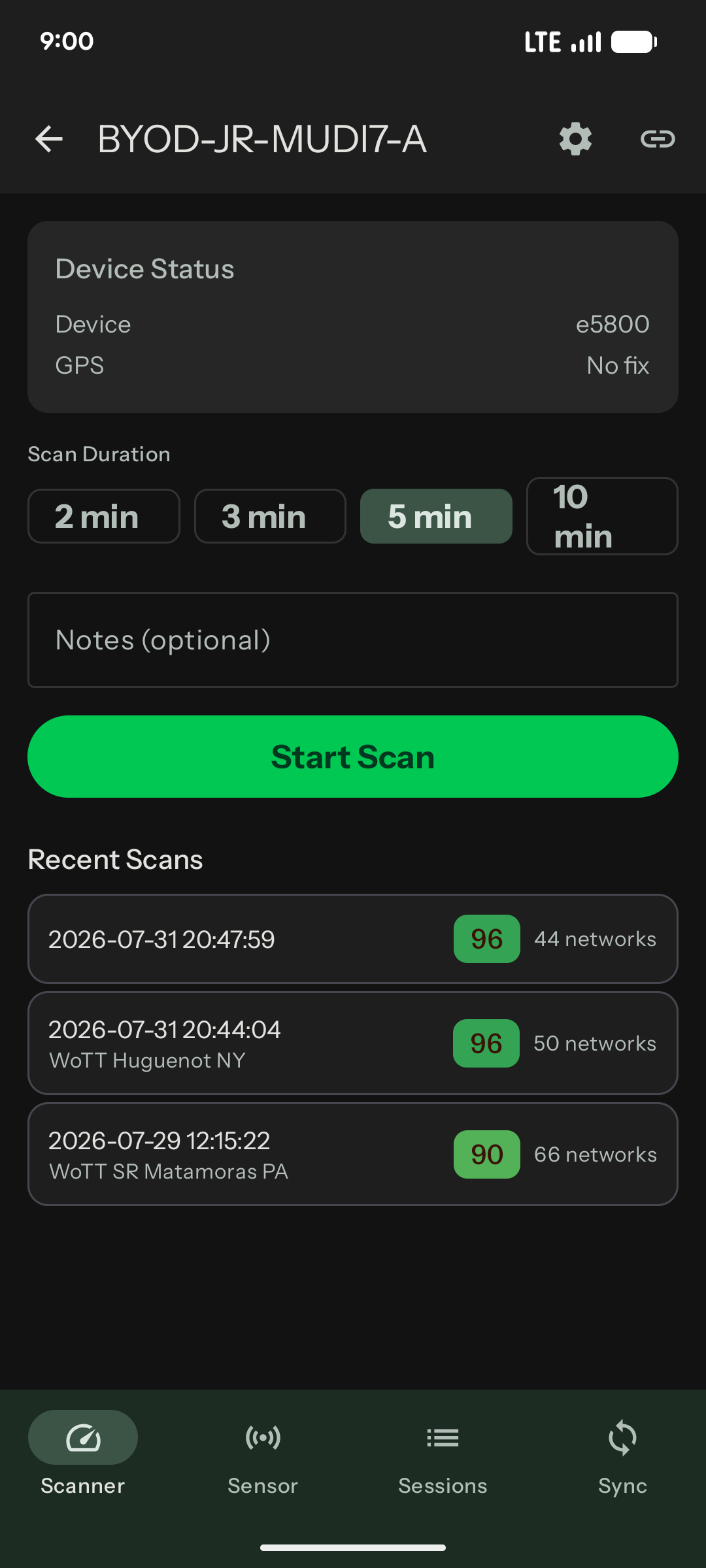
SurfScan app connected to a GL.iNet Mudi 7 router named BYOD-JR-MUDI7-A, showing recent scans with SurfScores of 96, 96, and 90

Get the SurfScan app

Free to download. Requires a GL.iNet Spitz AX, Puli AX, or Mudi 7 router (or a SurfScanGo) plus a SurfScore.live account.

Get it on Google Play
SurfScan app connected to a GL.iNet Mudi 7 router, showing scan duration options and recent scans SurfScan app live scan in progress on a GL.iNet router with per-operator SurfScores SurfScan app SurfScore report showing strongest tower and spectrum breakdown

Every scan builds the record.

A scan answers today's question. Your record at SurfScore.live keeps answering: every scan from your GL.iNet router or SurfScanGo lands there, scored on the same 0–100 scale everywhere. Return to any location with the ground truth at hand: exactly what you're working with, how to optimize your devices and SIMs, and what changed since last time. See the full platform at SurfScore.live →

Blind Redundancy

The third modem, the over-provisioned plan, the fibre ordered just in case.

All of them rational. The network visibility that would make them unnecessary didn't exist for mobile users at a price that made sense. It does now.

A one-off specialist survey today costs the same as four years of SurfScore, with no limits on the number of locations or scans, and when you have the real numbers in your hands, the just-in-case spending stops.

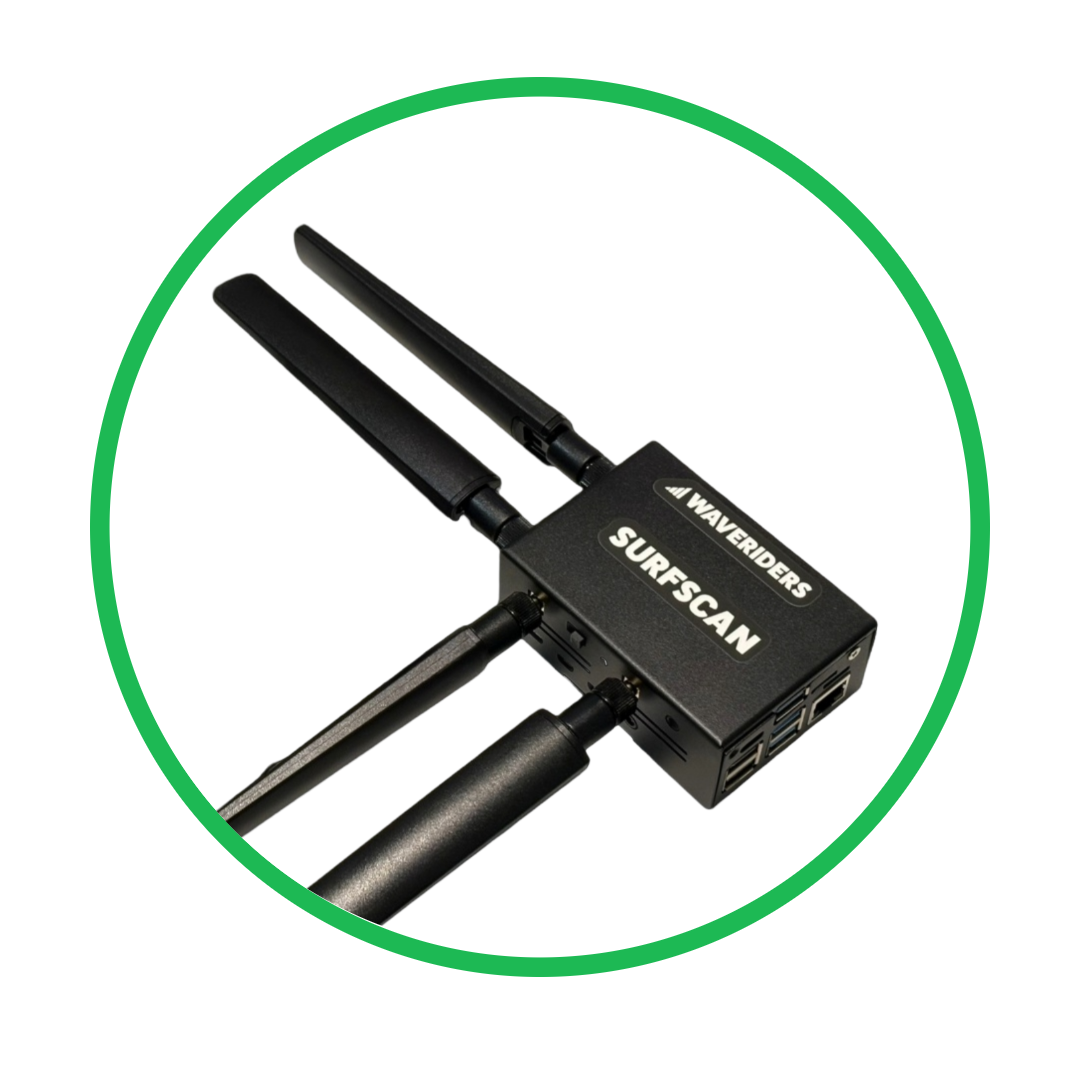
SurfScanGo

SurfScanGo portable cellular network analyzer

Portable cellular network analysis

$1,995 + Tax Buy Now

For the hands-on crowd who want a dedicated, fully offline device: SurfScanGo is a standalone scanning and analysis tool: no phone or router required. Configure custom duration scans, then run SurfScore analysis against the data to see exactly what's deployed at your specific location: every network, every band, bandwidth allocation, signal strength, and network quality.

  • SurfScore Analysis
  • Export reports to PDF or CSV
  • Portable and easy to use
  • Built-in Wi-Fi Hotspot
  • Cloud backup of all scan data
  • API for scan, analysis and management
  • Web based mobile-friendly interface
  • Works with the SurfScan Android app

Bonded Cellular Analysis

Band recommendations for multi-WAN uplink configurations. Know before you go: what SIMs to load, which bands to lock, and where the capacity actually is, instead of carrying a third modem to cover for not knowing.

Operator Comparison

Compare deployed mobile network capacity for all major operators at your locations, indoor and outdoor.

Network Validation

Independently validate your private 5G network or DAS deployment. Verify performance, coverage and contract compliance.

FirstNet Verification

Verify Band 14 coverage and quality for public safety deployments. Document network availability before you need it.

Experience Monitoring

Monitor user experience in 'Sensor Mode'. See how your network performs over time and identify potential issues before they become critical.

CBRS Detection

Detect CBRS networks in your area. Customize SAS requests to avoid interference before deploying your own network.

Frequency Range Sub-6 GHz Quectel RM520N-GL module
Compute Raspberry Pi4B with 8GB RAM. 64Bit OS
Scan Duration 3–15 minutes (3 minutes recommended minimum)
AdditionalConnectivity Wi-Fi Hotspot / Ethernet
Power USB-C Power Supply (included) or Powerbank (optional)
Interface Web-based interface or the SurfScan Android app

Ground truth reports

What is SurfScore™?

Filling in the blanks between the bars.

SurfScore ranks available networks based on a range of metrics. Beyond signal bars and metrics, we also take into account the frequency of the band, bandwidth available, and likely frame configuration. So, whatever your application; bonded cellular uplink, Point of Sale systems, or a simple coverage assessment, you get specific recommendations: such as which network and bands to optimize your equipment for.

On SurfScore.live: from a GL.iNet router or a SurfScanGo

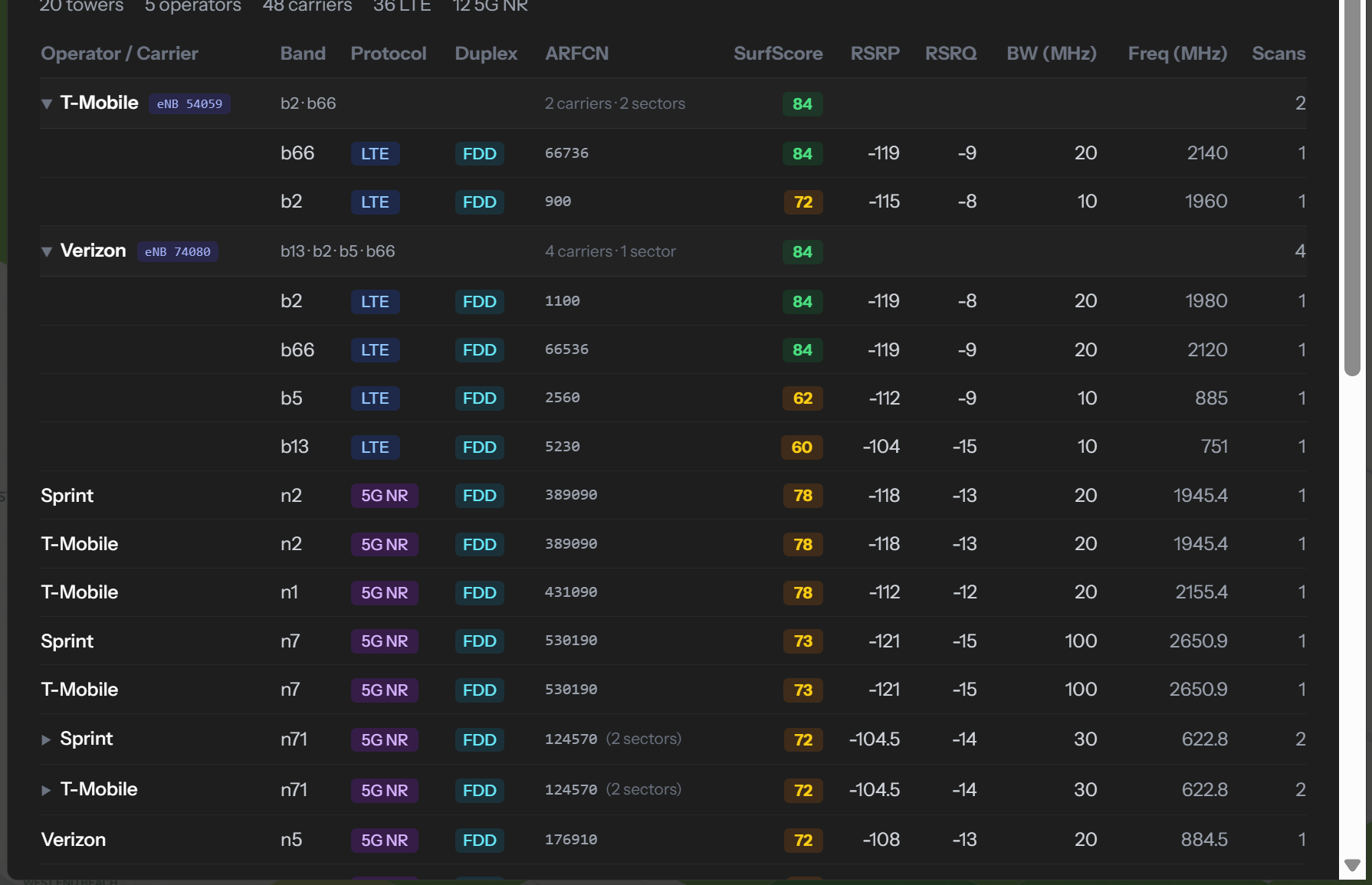
surfscore.live Expert Report showing tower-by-tower operator and band detail with SurfScore, RSRP, RSRQ, bandwidth, and frequency Click to expand

Expert Report

Every operator, band and protocol measured in one place: SurfScore, RSRP, RSRQ, bandwidth and frequency, grouped by the tower serving it, and flagged where two operators are sharing the same radio.

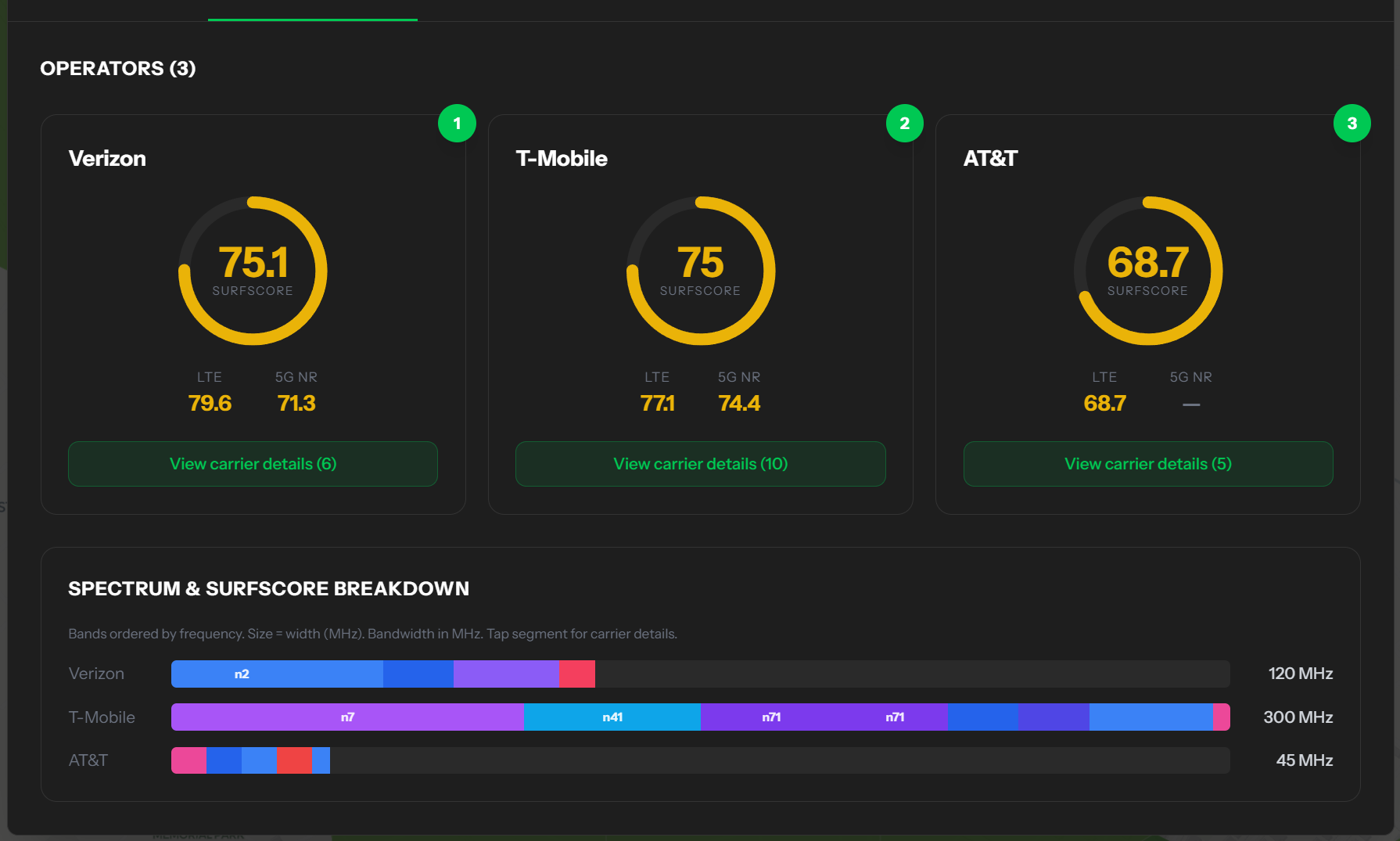
surfscore.live Operator Compare report showing SurfScores and spectrum breakdown for Verizon, T-Mobile, and AT&T Click to expand

Operator Compare

The operators side by side for one place: overall SurfScore, the LTE and 5G split, and how much spectrum each one is really running.

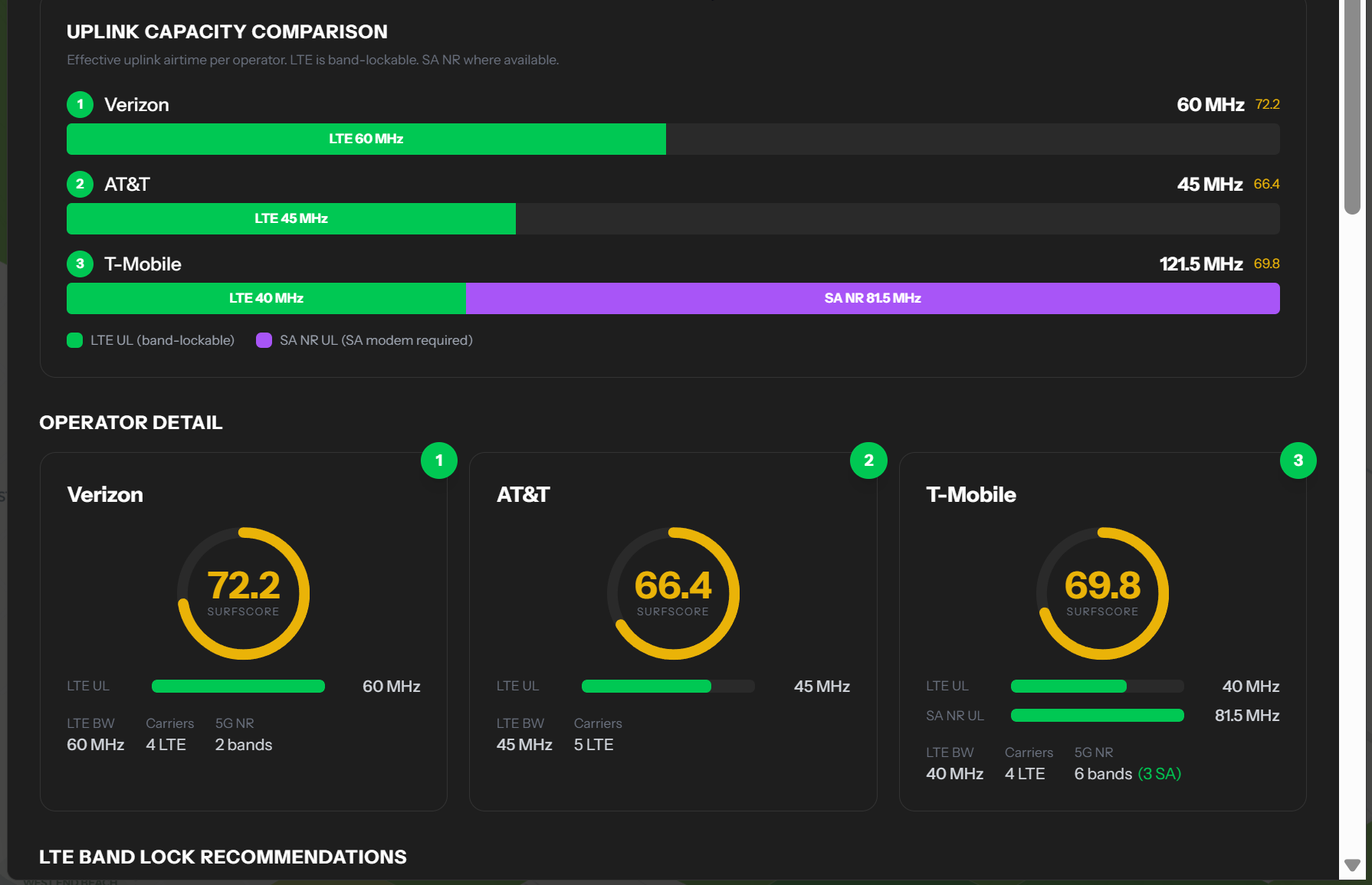
surfscore.live Bonded Uplink report showing uplink capacity comparison and LTE band-lock recommendations by operator Click to expand

Bonded Uplink beta

For anyone bonding modems: effective uplink airtime per operator, LTE band-lock recommendations, and where standalone 5G actually adds capacity.

Built into SurfScanGo: works fully offline

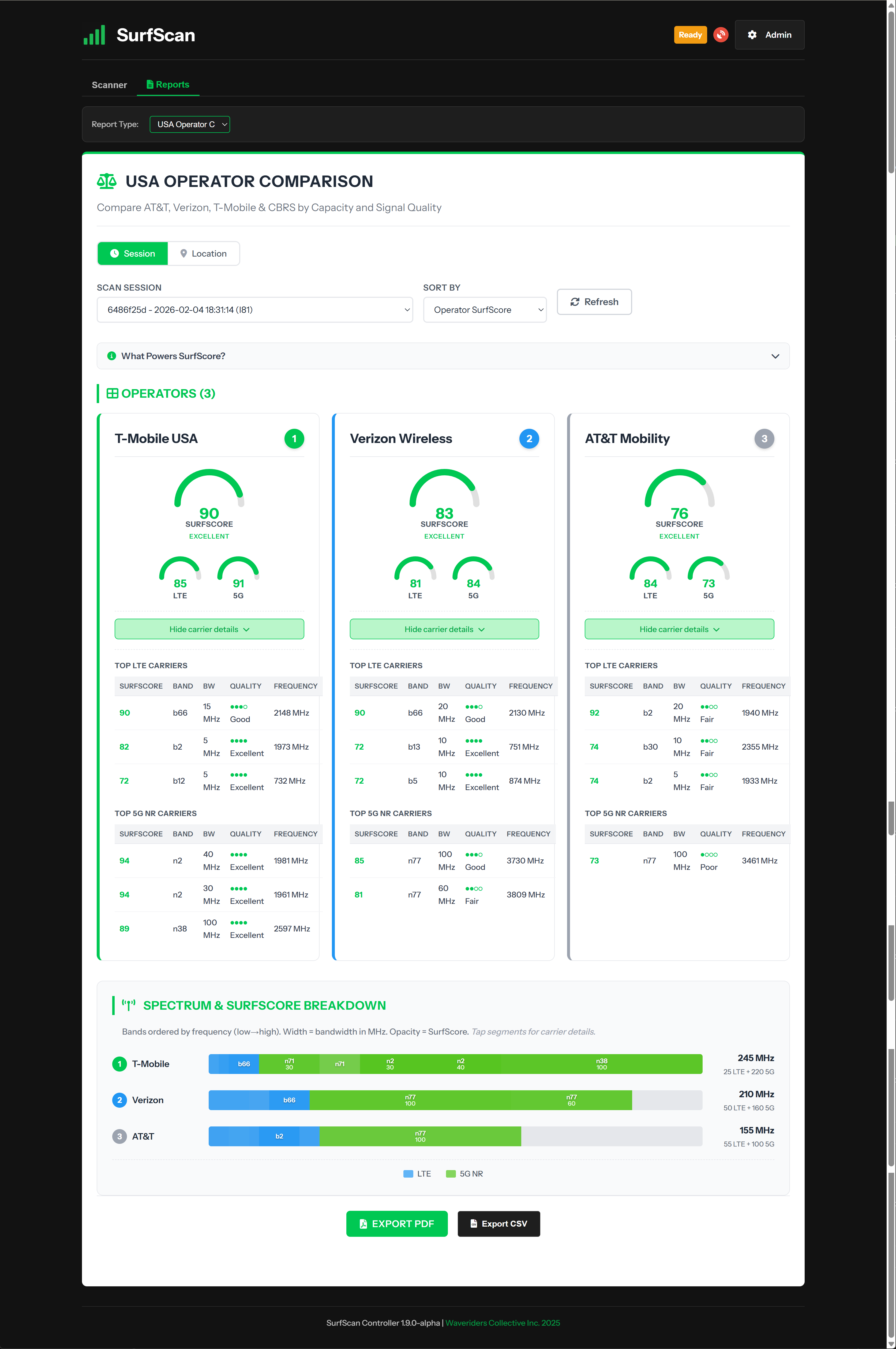
Operator Comparison report showing operator rankings and capacity analysis Click to expand

Operator Comparison

Side-by-side operator rankings by SurfScore. See which operator has the most deployed capacity at your location and make informed connectivity decisions.

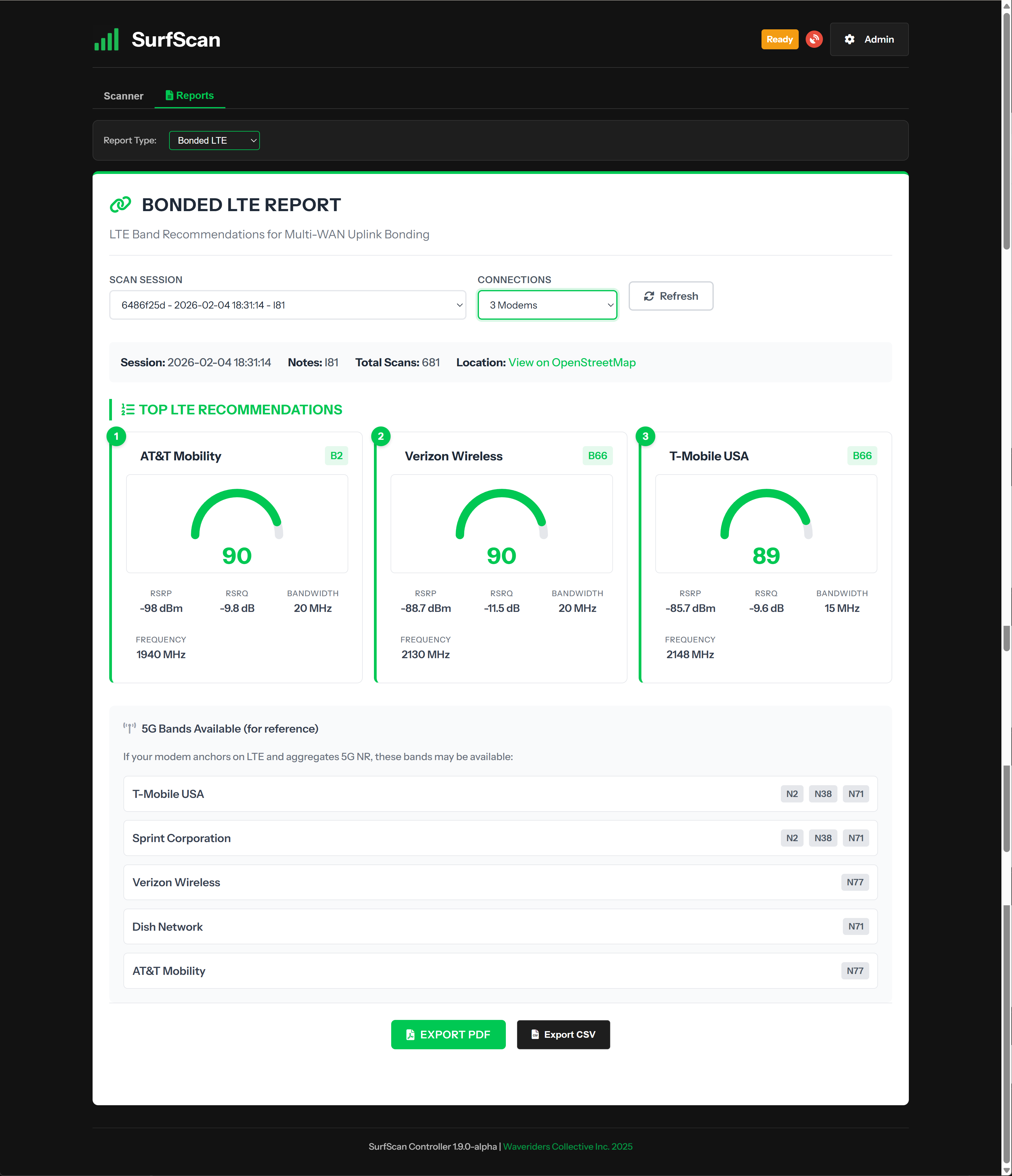
Bonded LTE Report showing top band recommendations with SurfScore ratings Click to expand

Bonded LTE Report

Top band recommendations ranked by SurfScore. Know exactly which networks and bands to configure for your multi-WAN bonding setup.

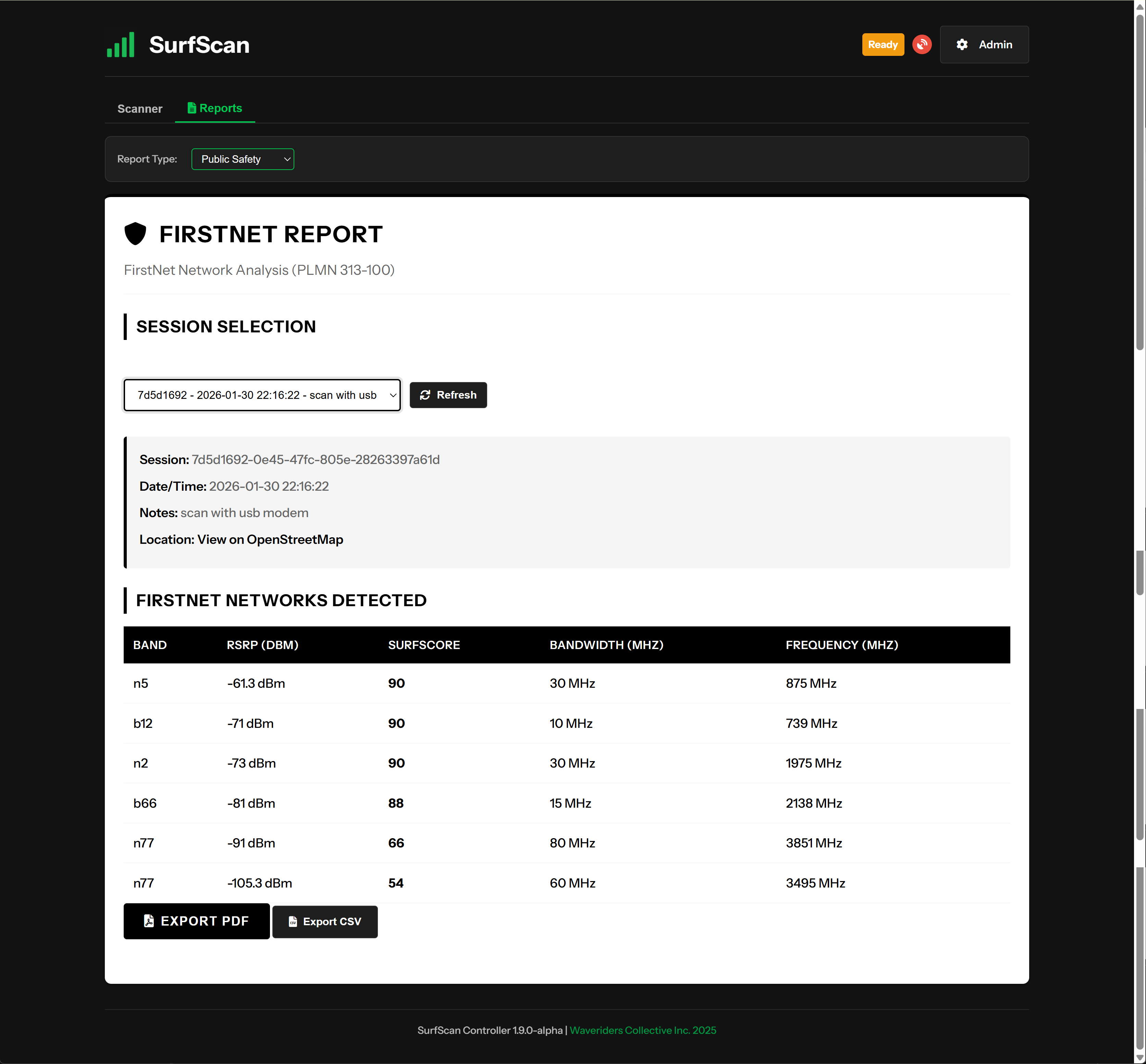
EMS FirstNet Verification report. Click to expand

EMS Coverage

Verify FirstNet coverage and document network availability. Identify coverage issues before they become critical.

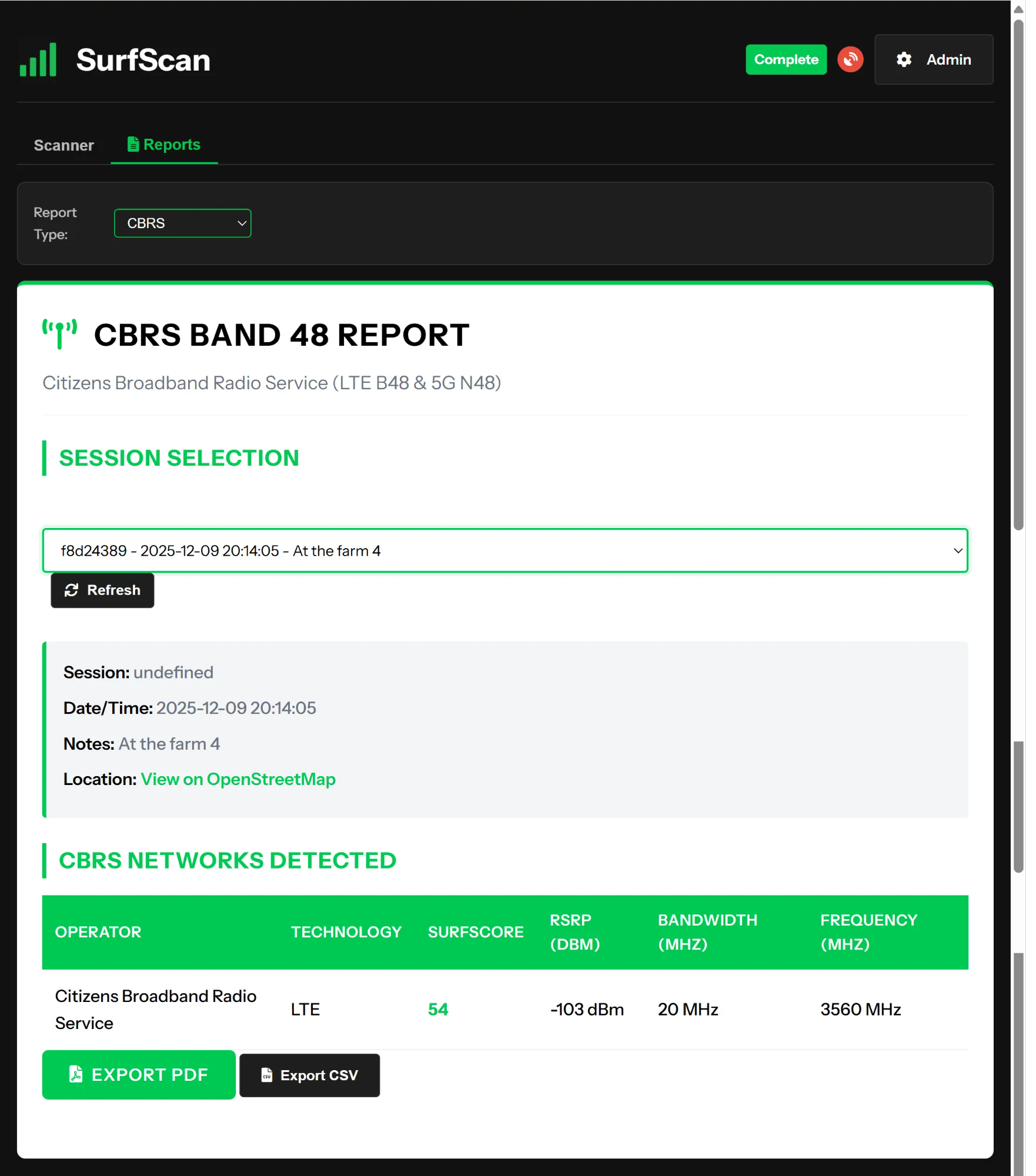
CBRS Band 48 Report showing private network detection Click to expand

CBRS Band 48 Report

Detect and analyze Citizens Broadband Radio Service networks. Essential for private LTE/5G deployments and interference analysis.

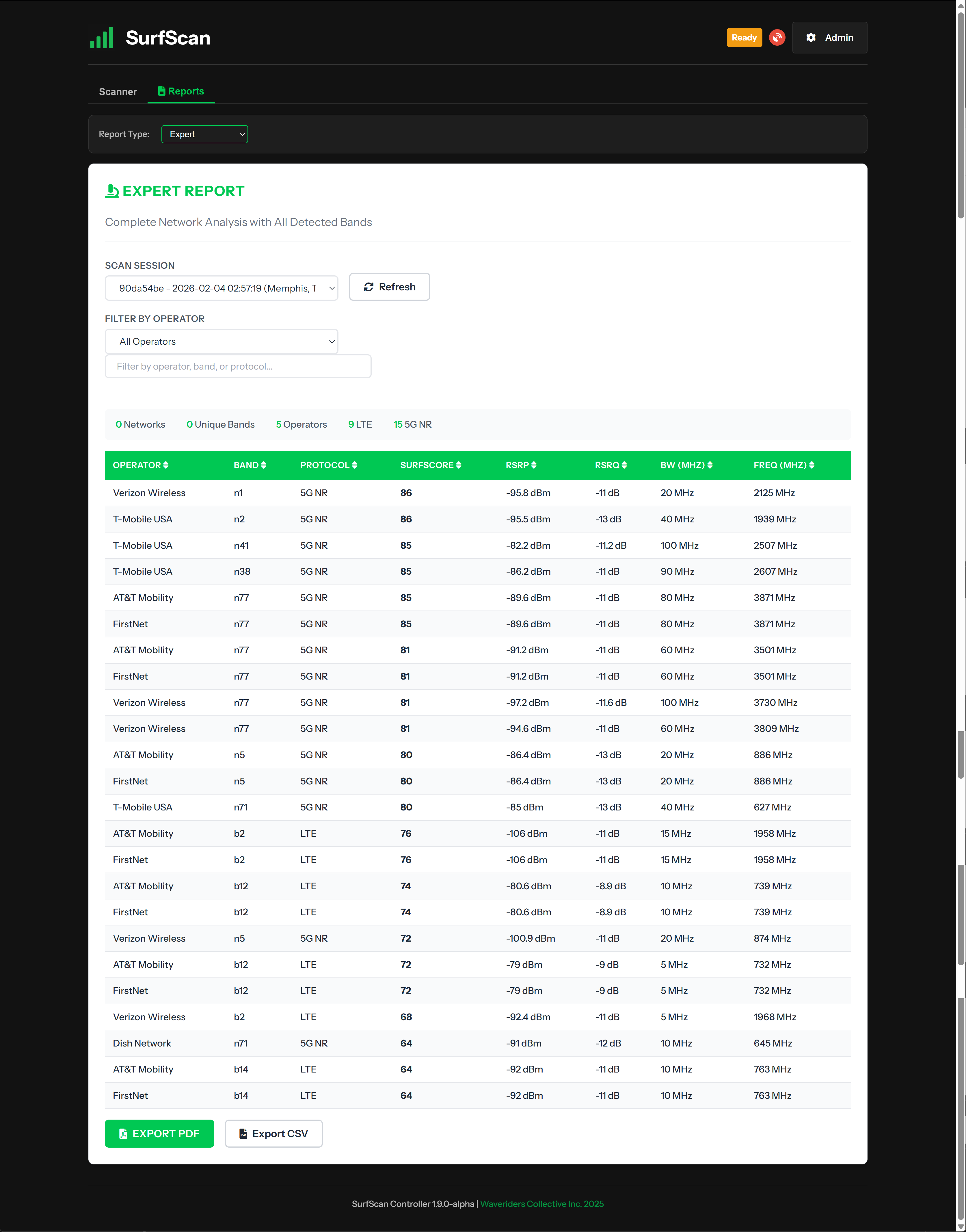
Expert Report showing all detected bands with detailed metrics Click to expand

Expert Report

Complete network analysis with every detected band. RSRP, RSRQ, bandwidth, frequency: all the data RF engineers need.

SurfScan live scanning interface showing real-time progress Click to expand

Live Scanning

Watch results come in real-time. LTE and 5G NR bands detected as you scan. Three minutes is the scan we recommend (a shorter one only finds you whatever's loudest), and extended sessions keep building the record.

Where this came from

We built this for ourselves first.

We deploy private 5G networks. Before you deploy one, you need to know what's already in the air: which networks, which bands, how close to the spectrum you're about to use. Nothing would tell us. So from March 2025 we built the instrument for ourselves, as a support tool for our own jobs. We weren't building a product. We were solving a problem we had on every job.

The first time it went out in the field, our private network was carrying point of sale at a live event. A carrier added CBRS spectrum to their macro for the event, sitting close to our frequencies. We saw it, changed our radio configuration, and the problem was over before it was a problem. Nobody had announced the change; without the instrument we'd have spent the day guessing.

See the data for yourself

Book a demo. We'll show you exactly what SurfScan captures and how SurfScore translates raw spectrum data into actionable recommendations.

Select a time that works for you:

Book Your Demo

Fifteen minutes, a live scan, your questions answered.